
Encode each camera once
The packager assembles the grid on request, so the encoder cost does not multiply with the number of combinations.
Multiple live feeds built into one stream
Watch multiple camera angles, several concurrent matches, or any mix of live channels in one stream, on any device. With AWS Elemental Dynamic Multiview, your viewers pick the feeds and the layout, while you pay only for the sources you encode, not every combination someone might choose.
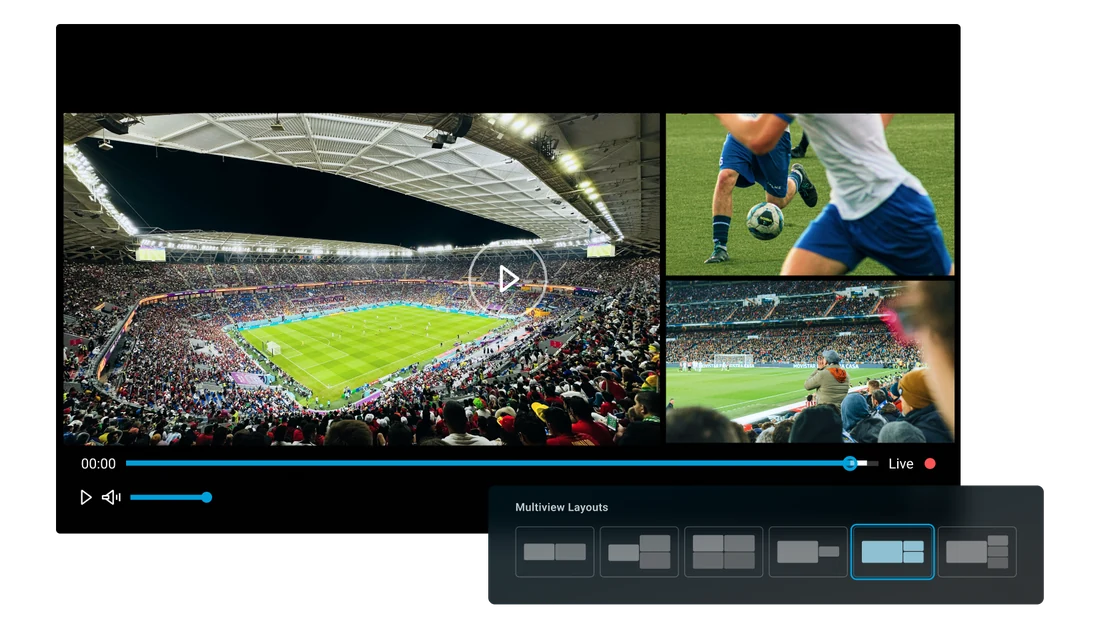
The packager assembles the grid on request, so the encoder cost does not multiply with the number of combinations.
What comes out is standard HLS or DASH. The composition is picked in the URL, not in client code.
Only the combinations viewers actually request are ever built, rather than every one they might.
Multiple live channels, composed into one stream by AWS Elemental Dynamic Multiview in AWS Elemental MediaPackage. Pick the sources and the grid, choose which source you hear, and move around the live window.

Checking the livestream
Log in to the Cloud Video Kit console and set up a live multiview channel. AWS Elemental Dynamic Multiview is configured there as part of AWS Elemental MediaPackage.
Multi-angle viewing is one of the few things audiences ask for by name - every camera at a race, several matches on one screen, the tactical camera next to the world feed - and it is one of the hardest to justify commercially. The two established ways of delivering it both scale the wrong way. A client-side multiview means a bespoke player per platform, several decoders running at once, and a device matrix that rules out most of the installed base. A server-side mosaic means encoding every layout and every combination of sources in advance, so the cost of the workflow grows with the number of grids nobody may ever open.
Both approaches also fix the experience at the moment of encoding or of app release. A viewer who wants a different pair of cameras, or a different arrangement of them, is asking for something that was either never encoded or was never built into the app.
The combinations are the cost. Encode them all in advance and most of them are never watched.
You carry several feeds of the same event and want to offer them side by side without shipping a custom player to every platform you support.
You produce more angles than a single programme can carry - tactical, onboard, referee - and want them watchable together rather than one at a time.
You distribute third-party channels and want a multi-channel view on existing set-top boxes and web players, without a device rollout.
Every camera or channel is encoded a single time in AWS Elemental MediaLive, at a ladder that suits every tile size it may be asked to fill, and delivered to AWS Elemental MediaPackage over CMAF ingest.
The player requests a manifest with a layout code and an ordered list of sources: multiple channels, and the grid they should fill.
AWS Elemental Dynamic Multiview is the AWS Elemental MediaPackage capability that assembles the requested tiles into one segment, without decoding, composing or re-encoding anything, picking exactly one rendition per tile.
The result is standard HLS or DASH, so a stock player shows it with no SDK, no overlay and no client-side synchronisation.
A different grid or a different set of sources is a different URL. Nothing upstream is rebuilt, and the cost follows what viewers actually request.
The composition happens in AWS Elemental MediaPackage, where the video already is, and it happens on demand. AWS Elemental Dynamic Multiview stitches the tiles in the compressed domain, so no combination has to exist before someone asks for it, and no client has to be taught anything to display one: a viewer changing the grid is a viewer changing a query string. Cost scales with the encoded source streams, not with the layouts viewers can create. What comes out is one stream - one DRM key, any device, no SDK.
Dynamic Multiview has graduated out of Labs. Cloud Video Kit now offers live multiview channels, powered by AWS Elemental Dynamic Multiview in AWS Elemental MediaPackage: you configure it on a live channel in the Cloud Video Kit console.
The workflow on this page still runs against real AWS Elemental MediaLive channels and a real AWS Elemental MediaPackage v2 channel group in our lab: the manifest URLs the demo prints are the ones it plays, and the layout codes and tile geometry are read off the compositions the packager emits rather than described.
Log in to the Cloud Video Kit console and set up a live multiview channel. AWS Elemental Dynamic Multiview is configured there as part of AWS Elemental MediaPackage.